Regain: Focus Control for disciplined Android study and work sessions
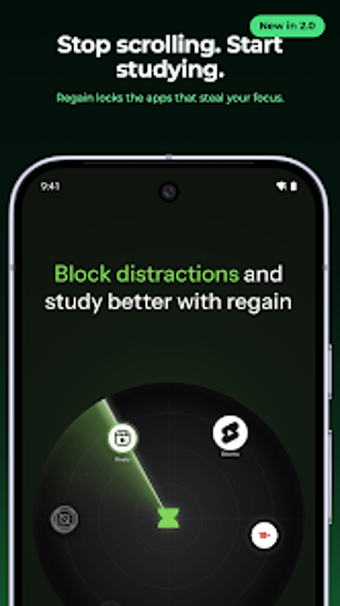
Blocks distracting apps and runs configurable focus timers together: countdowns, stopwatches, and Pomodoro sessions in active use. Developed by Apexmart Internet for Android productivity, the app ties app blocking to a timer and adds ambient sound and session tags for organised practice. It shows daily and weekly focus reports, offers a strict no-exit option for high-accountability sessions, and fits students, remote professionals, and people managing phone-driven attention challenges.
How blocking and timers perform in real work sessions
Regain combines an app blocker with three timer modes so you can align attention windows to tasks. The blocker locks selected apps when a session begins using Android's Accessibility Service, and the timer runs as a countdown, stopwatch, or Pomodoro interval. For exam study or concentrated project work, that pairing sets a single workflow: pick a subject tag, start a session, and the foreground app lock enforces the session length.
How accountability and privacy affect disciplined use
Strict Mode raises the friction to prevent premature exits by disabling pause and early termination during an active session, which supports high-accountability users. The developer implements blocking locally through Accessibility Services and reads only package identifiers, not screen content, which keeps blocking decisions on-device. That combination addresses users who need external constraints while preserving a privacy-first, local control model.
How ambient audio, tagging and reports support repeated practice
Built-in focus sounds such as rain, white noise, and brown noise play inside the timer interface to create a stable work background. Session tagging and notes let you label focus blocks by subject or project, and daily plus weekly progress reports show accumulated focus time and trends. Those elements structure repeated practice: scheduled slots trigger reminders, tags group sessions, and reports reveal patterns across study or work weeks.
How the app fits into device constraints and daily routines
The app targets Android devices running 7.0 or later and keeps a small footprint at about 24 MB, which suits standard business hardware and study phones. Scheduled focus reminders and local blocking make it practical for solo workflows on a single device, while the lack of cross-device features means teams must coordinate outside the app. The setup requires granting Accessibility permissions to enable blocking functionality.
Who should use Regain and when it makes sense
Regain suits self-directed students, remote professionals, and people managing attention who accept device-level controls and work primarily on a single Android device. It rewards regular, individual practice and high-accountability sessions, but is less relevant when cross-device coordination or team-shared scheduling is required. For focused, device-centric work routines, it performs as a practical discipline tool.